
Introduction: Why Some Real Estate Listings Get More Attention
You know the feeling.
You publish a new listing, and within minutes, it joins hundreds of other homes competing for attention online. Buyers scroll through photos quickly. They stop when something catches their eye. If the first few images feel dull, empty, dark, or confusing, they may keep scrolling.
That is where virtual staging for real estate listings can become a useful marketing tool.
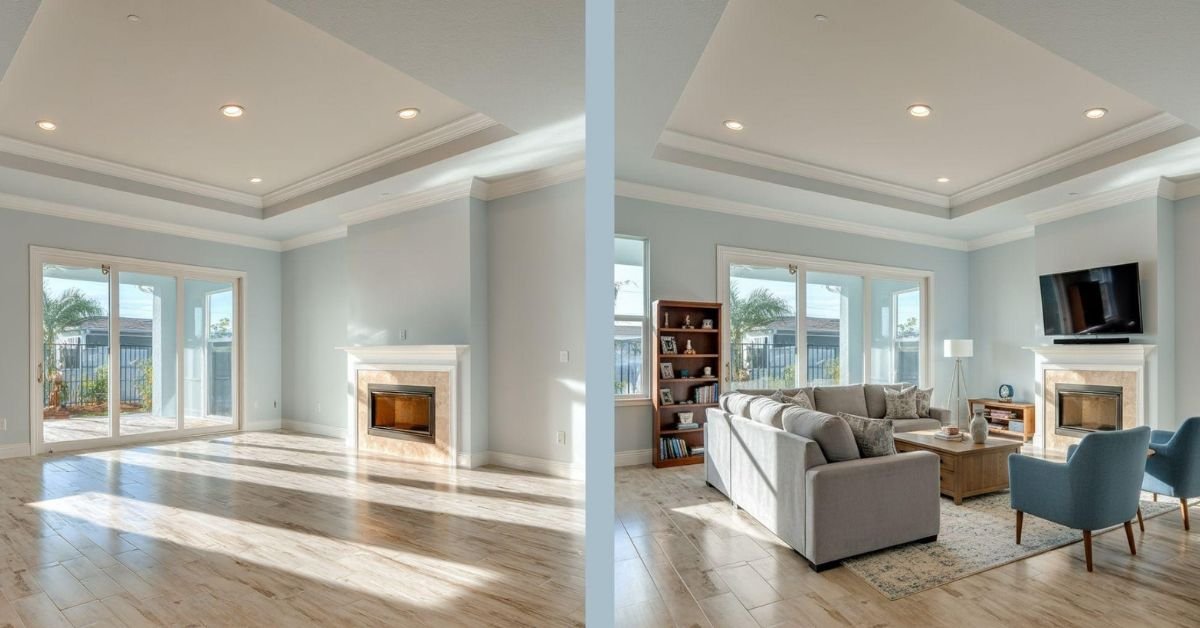
Instead of showing an empty living room, for example, you can digitally add a sofa, coffee table, rug, artwork, and other appropriate furnishings. The goal isn’t to make the property look like something it isn’t. The goal is to help potential buyers understand the space and imagine how they could use it.
Think of your listing photos as the storefront window of a home. Virtual staging can help you make that window more inviting.
But how should you actually use it?
Let’s look at practical ways you can use virtual staging to make your listings more noticeable, more understandable, and more engaging.
What Makes a Real Estate Listing Stand Out?
Before adding virtual furniture to your images, think about the bigger picture.
A memorable listing usually has several elements working together.
High-Quality Listing Photos
Your photos are often the first thing buyers see. Poor lighting, awkward camera angles, clutter, and distorted images can make even an attractive property look less appealing.
Virtual staging works best when it starts with a strong photograph.
You still need good composition, realistic lighting, straight vertical lines, and an accurate representation of the room.
A Clear Property Description
Photos attract attention, but your description helps buyers understand what they’re looking at.
If you digitally stage a large living room, for example, your description might point out the room’s open layout, natural light, fireplace, or connection to the dining area.
The image shows the possibility. Your words explain the property.
A Consistent Visual Experience
Imagine seeing a modern living room in one photo, a traditional bedroom in the next, and an ultra-glamorous dining room after that.
It can feel like three different houses.
Choose a visual direction that makes sense for the property and keep it reasonably consistent throughout the listing.
How Virtual Staging Improves Your Listing Photos
One of the biggest challenges for realtors is presenting an empty property.
An empty room can look larger in person but strangely flat in a photograph. Buyers may struggle to understand where a sofa belongs, whether a dining table will fit, or how much space remains for walking.
Virtual staging gives the room visual context.
Show Buyers How an Empty Room Could Be Used
A vacant rectangular room could become a living room, home office, children’s playroom, or dining area.
Instead of asking buyers to solve that puzzle themselves, you can show one practical possibility.
The key is to keep the design believable.
A tiny room shouldn’t suddenly contain a giant sectional sofa, oversized dining table, and six-foot plant.
Give the Room a Design Direction
Furniture also helps communicate a property’s personality.
A clean contemporary design may suit a newer condominium. A softer transitional design may work well for a traditional suburban home.
You aren’t simply adding furniture.
You’re helping buyers understand the lifestyle the space could support.
Highlight Existing Features
Virtual staging can also direct attention toward features already present in the property.
For example, if the home has:
- A fireplace
- Large windows
- High ceilings
- An open-concept layout
- A kitchen island
- Built-in shelving
- A spacious primary bedroom
Your furniture arrangement should complement those features rather than cover them.
That distinction matters.
The staging should frame the property—not compete with it.
Choose the Right Rooms to Virtually Stage
You don’t necessarily need to stage every room.
In fact, trying to digitally furnish every photograph can sometimes make a listing feel repetitive or artificial.
Instead, prioritize rooms that have the greatest impact on how buyers understand the home.
Start With the Living Room
The living room is often one of the most useful spaces to stage.
A sofa, coffee table, area rug, accent chair, and carefully selected accessories can immediately show scale and function.
Keep enough open space around the furniture so buyers can still understand the room’s dimensions.
Consider the Primary Bedroom
An empty bedroom can look surprisingly cold online.
A properly scaled bed, nightstands, lamps, artwork, and a simple bench can help buyers visualize the room as a comfortable private space.
You don’t need ten decorative objects on every surface.
Simple usually works better.
Don’t Forget Kitchens and Dining Areas
Kitchens often need less staging because cabinets and appliances already provide visual structure.
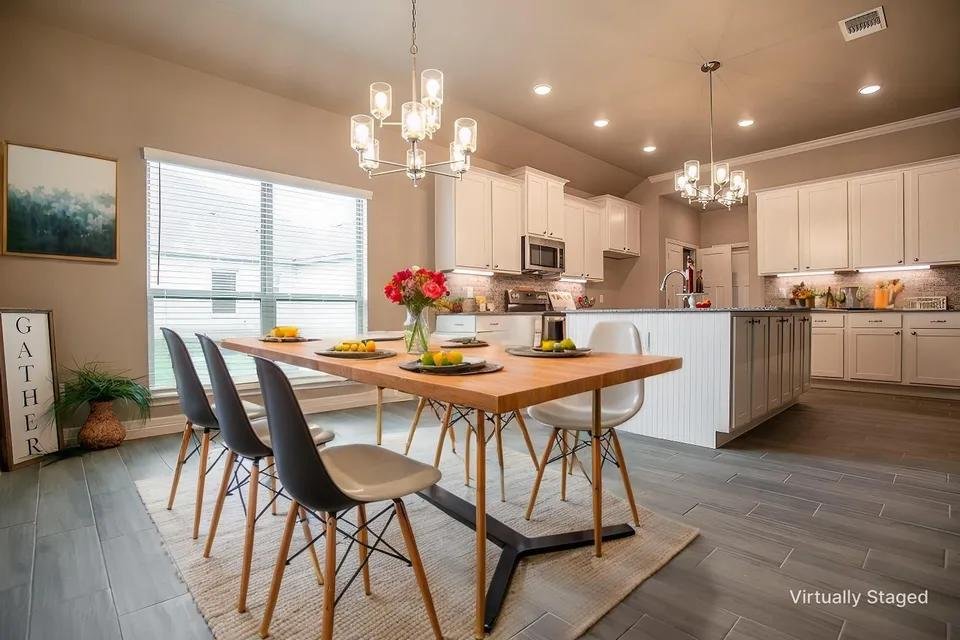
However, a modest dining setup or a few carefully chosen accessories can help communicate how the surrounding space works.
The same principle applies to breakfast areas and open-concept kitchens.
Stage Basements and Offices Strategically
A large unfinished basement can be difficult for buyers to interpret.
Could it become a family room? A home gym? A media room?
One realistic design concept can help answer that question.
Likewise, an empty office can demonstrate that the space works comfortably as a home workspace without changing its actual dimensions.
Select Furniture Styles That Fit the Property
Style matters.
You don’t want the staging to look disconnected from the home’s architecture or likely audience.
Modern and Contemporary
Clean lines, neutral colors, simple furniture, and uncluttered arrangements can work well with newer homes and condominiums.
Scandinavian and Minimalist
These styles can help create an airy feeling through simple furniture, light tones, and limited decoration.
They can be particularly useful when you want the room to feel spacious rather than crowded.
Traditional and Transitional
For homes with more traditional architectural details, classic or transitional furniture may create a more natural visual connection.
Think About the Target Buyer
Ask yourself a simple question:
Who are you trying to help picture themselves living here?
You don’t need to stereotype your buyer. Instead, consider the property’s location, size, layout, price range, and practical features.
The staging should support the property rather than overpower it.
Use Professional Photography as the Foundation
Virtual staging cannot rescue a poor photograph.
Think of your original image as the foundation of a house. If the foundation is weak, decorating the top won’t solve the underlying problem.
Before staging, pay attention to:
- Camera height
- Room composition
- Lighting
- Straight vertical lines
- Window exposure
- Clutter
- Reflections
- Visible architectural details
Then carefully review the finished staged image.
Does the furniture sit naturally on the floor?
Do the shadows make sense?
Are the proportions believable?
Can you still clearly see doors, windows, closets, stairs, and other important features?
Those details separate convincing virtual staging from an obvious digital rendering.
Use Your Staged Images to Strengthen Your Listing Description
Your photos and description should work together.
Suppose you have virtually staged a large basement as a family room.
Rather than writing as though the furniture actually exists, focus your description on the real property.
You could highlight:
- Basement size
- Ceiling height
- Windows
- Flooring
- Natural light
- Access points
- Storage
- Potential uses
The photograph illustrates a possible layout.
Your description communicates the actual features.
That distinction protects buyer trust.
Turn Virtual Staging Into Social Media Content
Your staged images don’t have to live only on the property listing.
You can repurpose them across your marketing channels.
Create Before-and-After Posts
A simple before-and-after image can demonstrate what virtual staging does.
Show the original vacant room first, followed by the staged version.
This format is easy to understand because buyers don’t have to read a long explanation.
Create Image Carousels
You can create a carousel featuring:
- Original living room
- Virtually staged living room
- Original primary bedroom
- Virtually staged primary bedroom
This gives viewers a quick visual tour.
Create Short Videos
You can also turn several staged images into a short property marketing video.
For example, you might move from the exterior to the living room, kitchen, primary bedroom, and basement.
Keep the presentation simple.
Your goal is to encourage people to explore the property—not overwhelm them with effects.
Use Virtual Staging in Digital Advertising
If you’re running digital ads for a listing, the image often has to earn attention before anyone reads your headline.
That makes your strongest property photographs extremely important.
You can test different images based on the property’s marketing objective.

For example:
- Living room image for general property awareness
- Kitchen image for lifestyle-focused advertising
- Primary bedroom image for emotional appeal
- Basement image to highlight additional usable space
Don’t assume every image performs equally.
Track your results and learn which types of visuals generate more engagement.
Create a Consistent Visual Experience Across the Listing
Consistency doesn’t mean every room needs identical furniture.
It means the overall presentation should feel intentional.
If your living room uses warm neutral colors and contemporary furniture, a completely different design language in the bedroom can create visual confusion.
Pay attention to:
- Furniture scale
- Color relationships
- Lighting
- Flooring
- Architectural details
- Overall design style
And avoid using exactly the same furniture arrangement in every room.
Your listing should feel like one home, not a collection of unrelated showroom displays.
Be Transparent With Virtually Staged Images
Trust is one of the most important parts of real estate marketing.
Virtual staging should clarify possibilities—not create false expectations.
If an image contains digitally added furniture, identify it appropriately according to the requirements that apply to your listing and market.
Keep the original property photographs available as appropriate.
Most importantly, don’t digitally remove or disguise significant property defects or alter the architecture in a way that could mislead buyers.
A staged image should answer:
“What could this room look like with furniture?”
It should never create confusion about:
“What does this property actually contain?”
Common Virtual Staging Mistakes Realtors Should Avoid
Even good technology can produce poor marketing if you don’t review the result.
Watch for these common problems.
Furniture That Is Too Large or Too Small
A dining table that nearly touches every wall makes the room appear smaller.
A tiny sofa floating in a huge room does the opposite.
Scale matters.
Blocking Doors and Windows
Furniture should never make important architectural features disappear.
Keep entrances, windows, closets, stairs, and walkways visible.
Using the Wrong Style
A heavily ornate design may look strange in a simple modern condo.
Match the staging to the property.
Adding Too Much Décor
More isn’t always better.
Too many plants, accessories, pillows, paintings, and decorative objects can turn a clean room into visual noise.
Skipping the Final Review
Never publish a generated image without checking it carefully.
Look for distorted furniture, strange shadows, incorrect reflections, misplaced objects, and changes to the original architecture.
You’re the final quality-control step.
7 Actionable Ways to Make Your Listings Stand Out
If you want a simple starting system, try these seven steps:
1. Start with professional photography.
Give your virtual staging a clean, high-quality foundation.
2. Prioritize important rooms.
Start with the living room, primary bedroom, kitchen/dining area, and other spaces that need visual explanation.
3. Choose a suitable design style.
Match the staging to the home’s architecture and likely audience.
4. Pay close attention to scale.
Make sure furniture fits naturally within the actual room.
5. Protect the property’s original architecture.
Don’t change doors, windows, walls, stairs, room dimensions, or other structural features.
6. Repurpose your images.
Use them in listings, social media, email campaigns, digital ads, and short-form video.
7. Measure your marketing results.
Compare engagement, inquiries, showing activity, and buyer feedback within the broader context of your listing strategy.
This turns virtual staging from a one-time image service into part of your marketing workflow.
How Do You Know If Virtual Staging Is Working?
Don’t judge the results only by whether the image looks attractive.
Look at the bigger picture.
You can monitor:
- Listing views
- Photo engagement
- Social media engagement
- Website traffic
- Buyer inquiries
- Showing requests
- Feedback from buyers and other agents
- Time on market
Of course, many factors affect these numbers, including pricing, location, property condition, season, inventory, and demand.
Virtual staging is one piece of the marketing puzzle.
But when you use it strategically, it can make that piece much stronger.
Conclusion: Make Every Listing Image Work Harder
Your listing doesn’t get a second chance to make a first impression.
When buyers scroll through properties online, you have only a few seconds to give them a reason to stop.
Virtual staging can help you turn an empty or visually confusing room into something buyers can understand. It can demonstrate scale, suggest function, reinforce a design direction, and give your listing more visual material to use across multiple marketing channels.
But the real advantage comes from how you use it.
Choose the right rooms. Use realistic furniture. Protect the property’s architecture. Keep your marketing transparent. Then repurpose those images everywhere your potential buyers are looking.
Think of virtual staging as another tool in your marketing toolbox.
Used thoughtfully, it doesn’t replace your job as a realtor. It helps you tell the property’s story more clearly—and gives buyers a better reason to keep looking.
Frequently Asked Questions
1. Can virtual staging help attract more attention to a real estate listing?
It can make listing photos easier to understand and more visually engaging, particularly when rooms are vacant or difficult to visualize. However, buyer interest depends on many factors beyond staging.
2. Which rooms should a realtor virtually stage first?
Start with rooms that have a strong impact on how buyers understand the property. Living rooms and primary bedrooms are common choices. Basements, offices, and other unusual spaces can also benefit when their purpose isn’t immediately obvious.
3. Can I use virtually staged images on social media?
Yes. You can repurpose suitable staged images for social posts, carousels, advertisements, email marketing, and short videos. Make sure your presentation clearly distinguishes digitally staged elements from the property’s actual features.
4. Should I replace my original listing photos with virtually staged versions?
Not necessarily. Original photos provide an accurate representation of the property, while staged images can demonstrate possible furniture arrangements and uses. Using both can give buyers a more complete understanding of the home.
5. What makes virtual staging look realistic?
Realistic furniture proportions, natural lighting, believable shadows, correct perspective, appropriate décor, and strict preservation of the property’s actual architecture all contribute to a convincing result. A final human review is also essential.